HomeAutomation

The wiring behind the funnel.

Forms, calendars, CRMs, inboxes and ad platforms — connected so leads get followed up in seconds, not days. These are real builds, shown as they run inside GoHighLevel, Zapier and Make.

GoHighLevel workflows

From first click to booked appointment.

Workflows that catch a lead the moment it lands, follow up until it books, and keep the pipeline honest along the way.

3 workflows
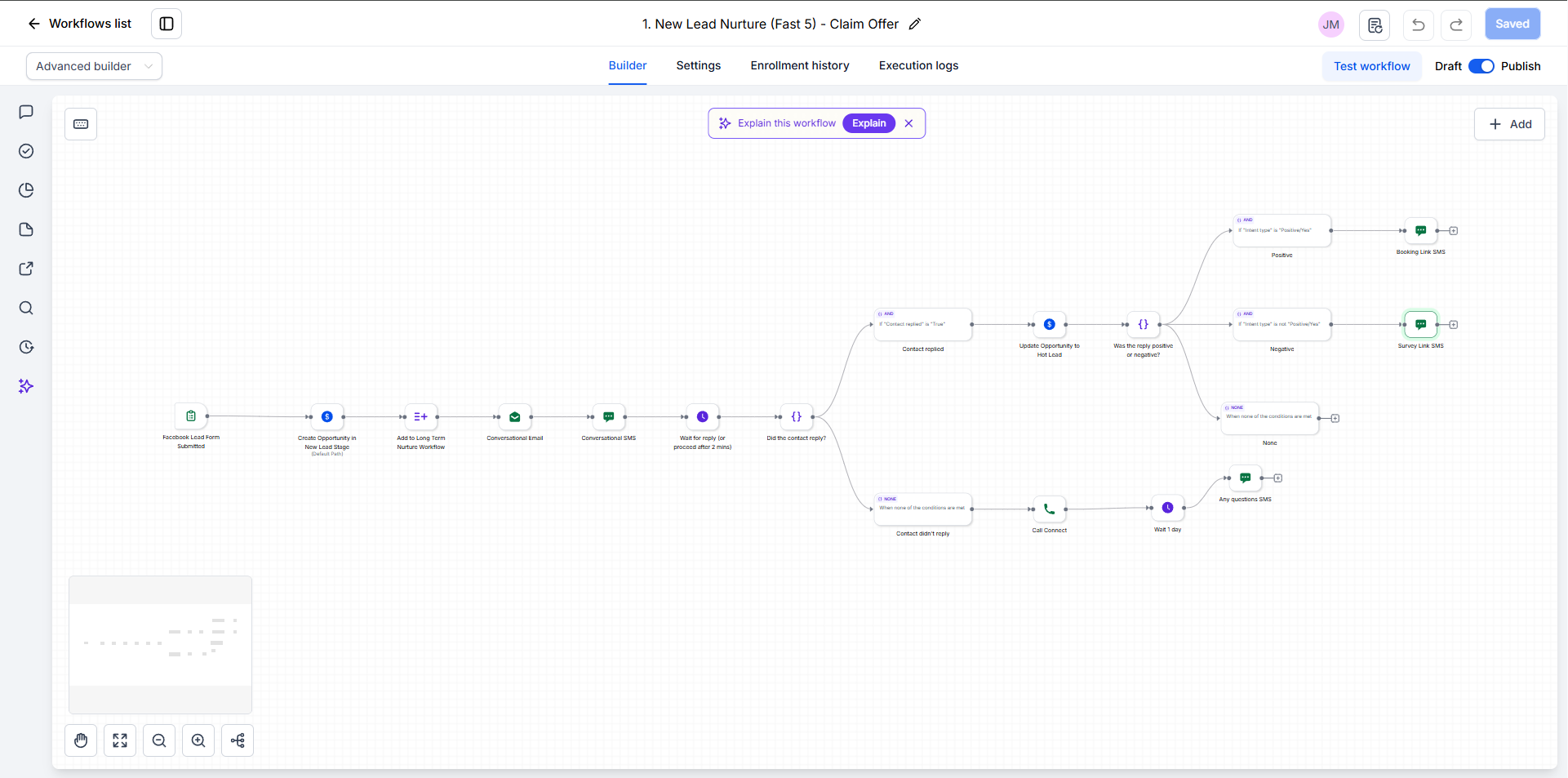
GoHighLevel · New Lead Nurture (Fast 5) — Claim Offer
GoHighLevel New Lead Nurture workflow with reply branching Expand
WORKFLOW 01 · LEAD NURTURE

New Lead Nurture — Claim Offer

Built for speed-to-lead. The moment someone submits a Facebook lead form, they're in the pipeline and hearing from the business — and the workflow decides what happens next based on whether, and how, they reply.

  • Trigger: Facebook lead form submitted
  • Opportunity created in New Lead; contact added to long-term nurture
  • Conversational email + SMS go out instantly
  • Waits for a reply (moves on after 2 minutes)
  • Replied: moved to Hot Lead — positive replies get a booking link, negative ones a survey link
  • No reply: Call Connect rings the lead, then an "any questions?" SMS the next day
Facebook Lead AdsSMSEmailCall ConnectReply branching
Handoff: when a nurtured lead books, Workflow 02 takes over and removes them from the nurture sequence.
GoHighLevel · Appointment Confirmation + Reminders
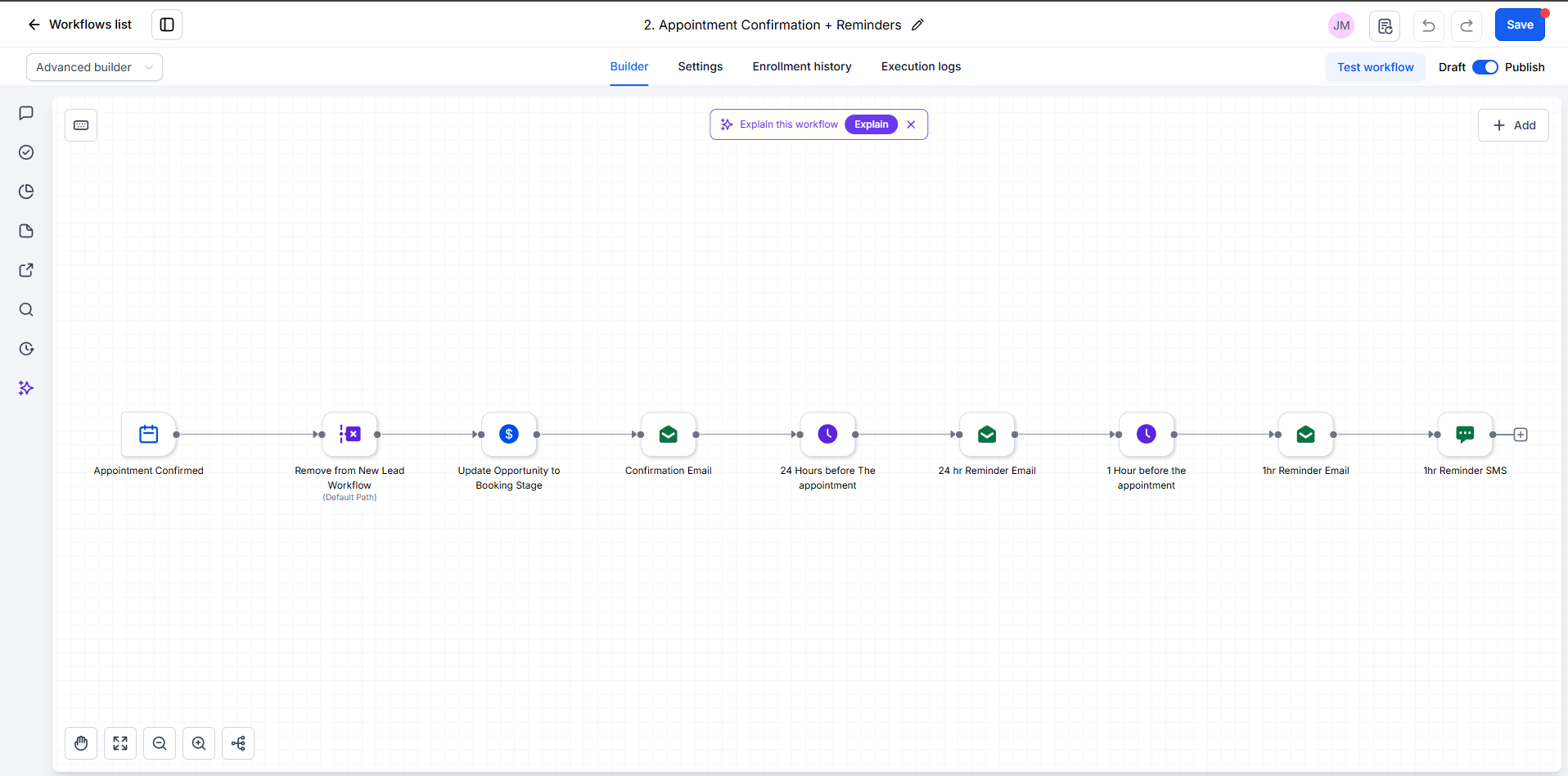
GoHighLevel appointment confirmation and reminders workflow Expand
WORKFLOW 02 · BOOKINGS

Appointment Confirmation + Reminders

Once a lead books, sales follow-ups stop and the reminders start. The deal moves to Booking automatically, and the customer hears from the business at exactly the right moments before they show up.

Appointment confirmed Removed from nurture Opportunity → Booking Confirmation email 24 hr reminder email 1 hr email + SMS
Calendar triggerPipeline stagesEmailSMS
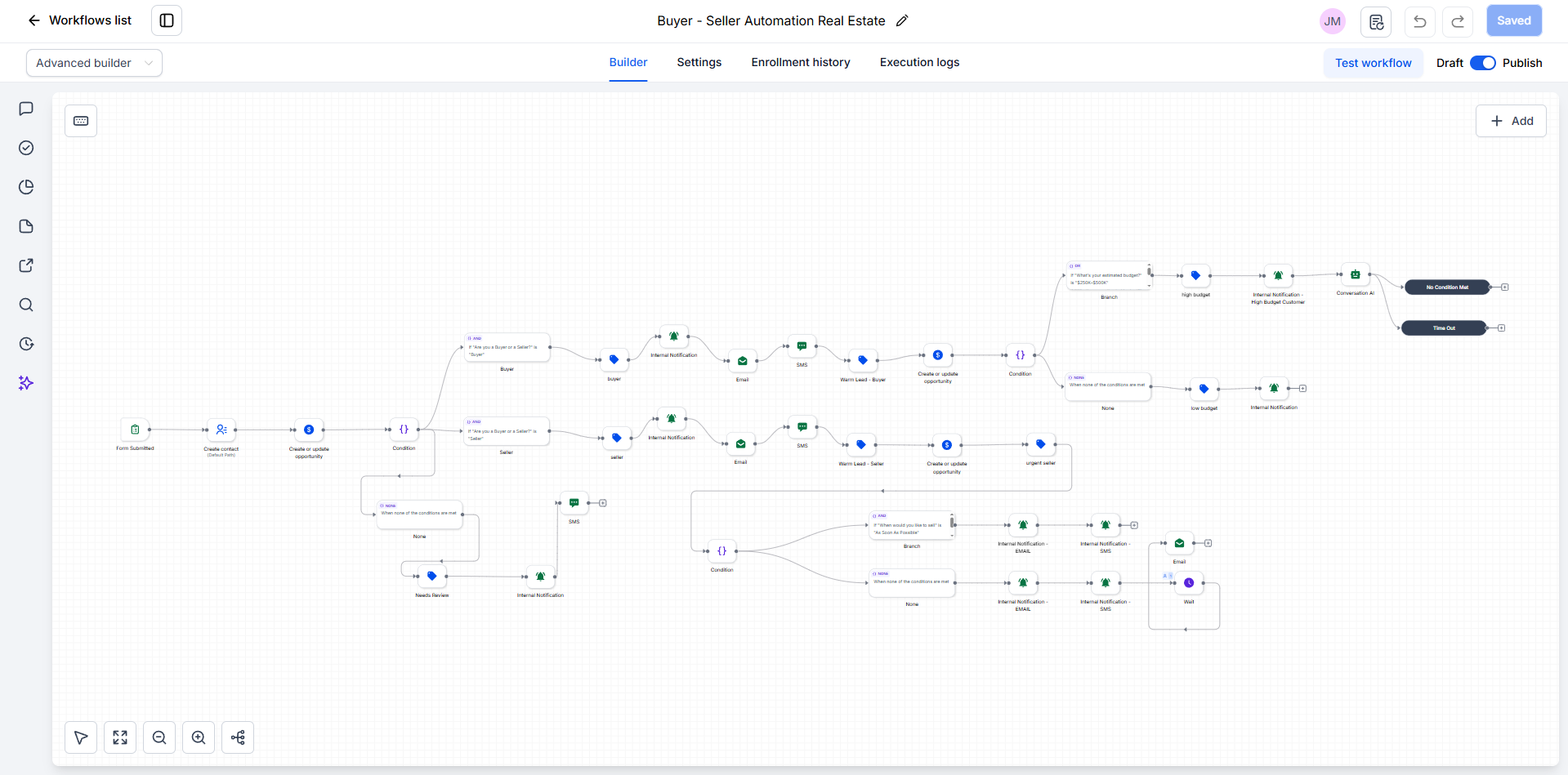
GoHighLevel · Buyer – Seller Automation Real Estate
GoHighLevel buyer and seller real estate lead routing workflow Expand
WORKFLOW 03 · LEAD ROUTING

Buyer / Seller Automation — Real Estate

One intake form that sorts real estate leads into buyers and sellers, tags and follows up with each, and alerts the agent the moment a lead is worth dropping everything for.

  • Trigger: form submitted → contact and opportunity created
  • Buyers: tagged, emailed and texted; a $250K–$500K budget flags a high-budget lead, alerts the agent and hands off to Conversation AI
  • Sellers: tagged, emailed and texted; "as soon as possible" sellers are flagged urgent with email + SMS alerts to the team
  • Neither: tagged Needs Review with an internal alert
Lead routingTaggingInternal alertsConversation AI

Voice AI & Chatbots

Conversational AI inside GoHighLevel that answers calls, qualifies leads, and books appointments — trained on the client's own offers and objections.

  • Inbound & outbound voice agents
  • Website & SMS chatbots
  • Trained on real FAQs & pricing
See a demo
Zapier zaps

Lightweight zaps that keep small teams in sync.

Quick, reliable connections between the tools a team already uses — no new software to learn.

1 zap
Zapier · Editor
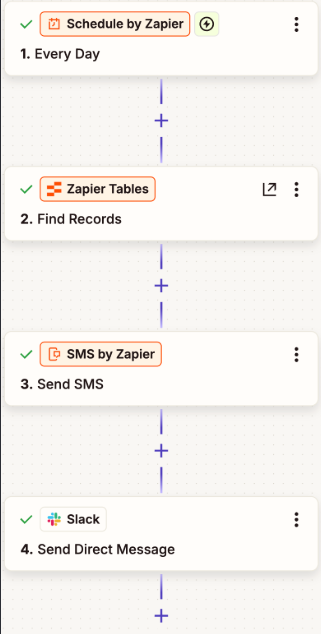
Zapier zap: Schedule, Zapier Tables, SMS by Zapier, Slack Expand
The live zap4 steps · runs every day
Zapier · How it connects
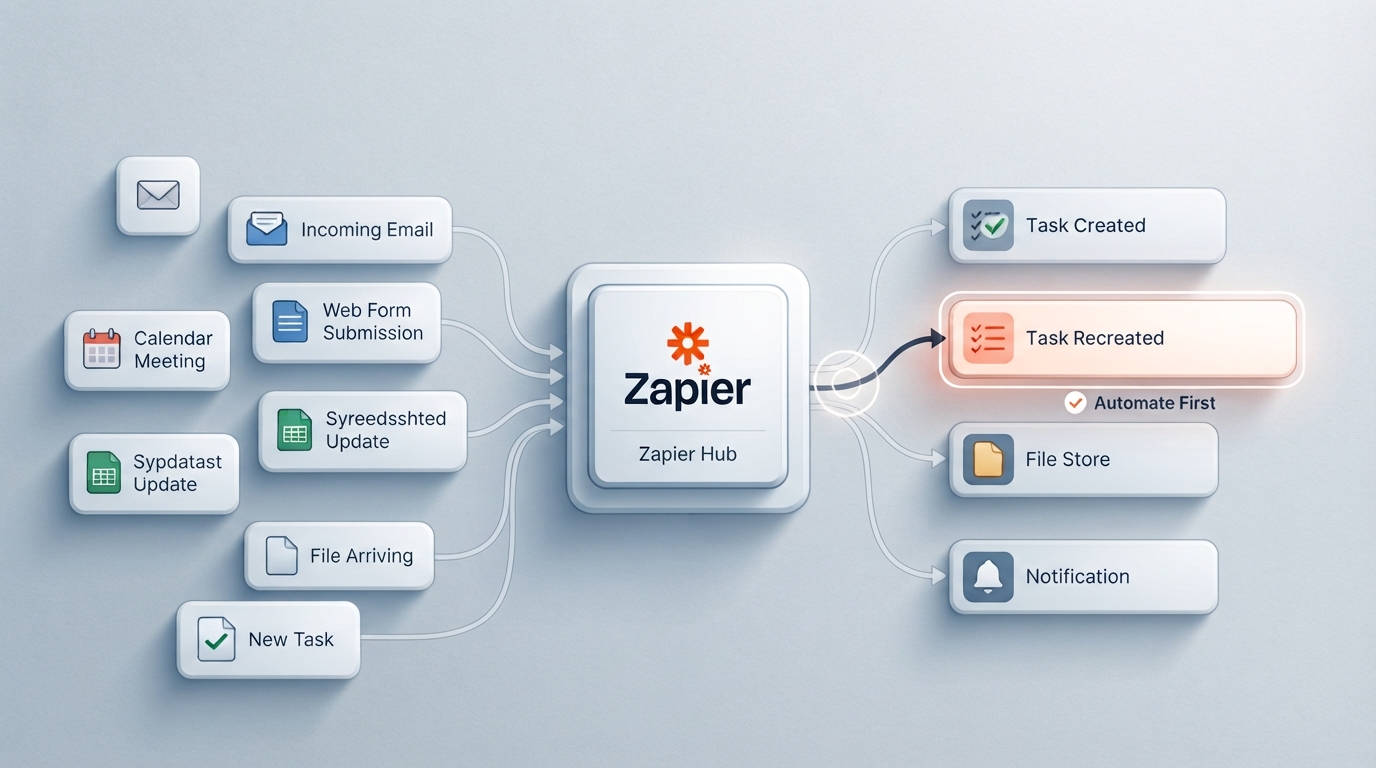
Diagram of Zapier connecting email, forms, calendar and spreadsheets to tasks, files and notifications Expand
ZAP 01 · SCHEDULED

Daily Reminder Zap

Runs on its own every day: it pulls the matching records from a Zapier Table, sends the SMS, and messages the team on Slack so everyone knows what went out — no one has to remember to do it.

Schedule · every day Zapier Tables · find records SMS by Zapier Slack DM
ScheduledZapier TablesSMSSlack
Make scenarios

Multi-step scenarios for branching logic.

When a process needs filters, routers and loops, Make handles it visually — one trigger, several outcomes.

1 scenario
Make · Content Calendar → Social Publishing
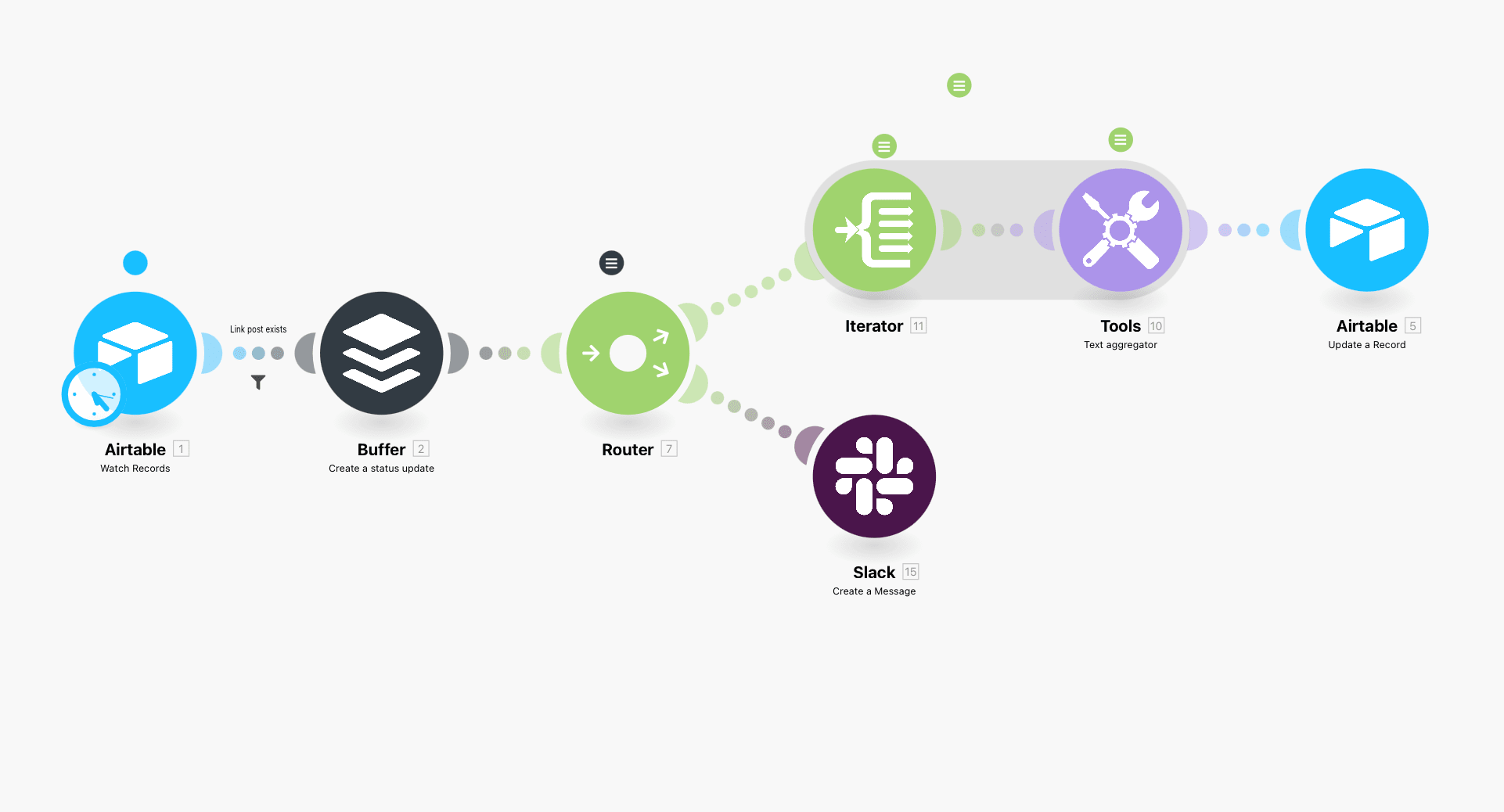
Make scenario: Airtable, Buffer, Router, Iterator, Text aggregator, Airtable update, Slack Expand
SCENARIO 01 · CONTENT OPS

Content Calendar → Social Publishing

Turns an Airtable content calendar into scheduled posts. When a record is ready, Make queues it in Buffer, then splits into two routes: one writes the result back to Airtable, the other tells the team on Slack.

AirtableBufferRouterIteratorSlack
Main path
  • Airtable watches the content calendar on a schedule
  • Filter: only records with a link post continue
  • Buffer creates the status update
  • Router splits into two routes
Routes
  • Route 1: Iterator + text aggregator compile the post details, then Airtable updates the record
  • Route 2: Slack posts a message so the team knows it's queued
Wire it up

Let's connect your stack.

Let's Connect